

INTRANET TOUR | Highlights from MBH's Transition to Synthesis 6
Featured Guests
Hillary Thompson, Director of Brand Communications
Summary
We’re excited to share this interactive tour of Archie, MBH’s Synthesis 6 intranet. Our tour guide will be Hillary Thompson, Director of Brand Communications.
Featured Guests
Hillary Thompson, Director of Brand Communications
Webinar Summary
We’re excited to share this interactive tour of Archie, MBH’s Synthesis 6 intranet. Our tour guide will be Hillary Thompson, Director of Brand Communications.
MBH launched the new Archie to all employees in August, after a six month transition process.
In this Intranet Tour, Hillary will share:
How employees use Archie to find expertise across MBH’s US and India offices
Inspiring examples of scaling Technical Design learning across the business
Synthesis 6 transition strategies and lessons learned
Webinar Timeline
INTRANET TOUR
00:58 Speaker Introduction
01:50 Introduction to MBH
02:55 Marketing and Knowledge Management
TOUR
04:45 Archie Overview
05:30 Activity Stream
06:07 Example Post from Mumbai Office
07:39 Employee Profiles: “Pronounce My Name”
08:38 Employee Profiles: “I Can Help With”
10:35 Need Help? Smart Employee Block on Technology Pages
11:50 #ArchieTips
12:38 Directory: Experience Under Previous Association
13:33 Intranet 101: Completing the “About Me” Section
14:16 Updating Profiles as Part of the Annual Review Process
15:10 Technical Lessons Posts
18:16 Internal University Program: “Framework”
19:40 Example Framework Post
20:18 Benefits of Framework Posts
21:26 Rethinking Intranet Navigation: Benefits
23:13 Custom Icons
24:28 Office Resources by Location
PROCESS
26:10 Transition Overview
26:58 Rethinking Navigation and Populating Content
28:48 Prioritizing Future Content Development: Studio Workspaces
30:46 Change Management and Messaging
32:50 Preparing All Staff for Launch
Q+A
34:07 Q: What is the process for creating and reviewing content?
36:45 Q: How do you leverage Archie to onboard new offices?
39:00 Q: Show us your custom Marketing Icon Library!
41:30 Q: How much was from KA’s template and how much did you customize?
42:58 Q: Can anyone comment in such a way that the posted content can be updated?
More Case Study Webinars

Register for our next Office Hours Webinar
Introducing Synthesis Responsive
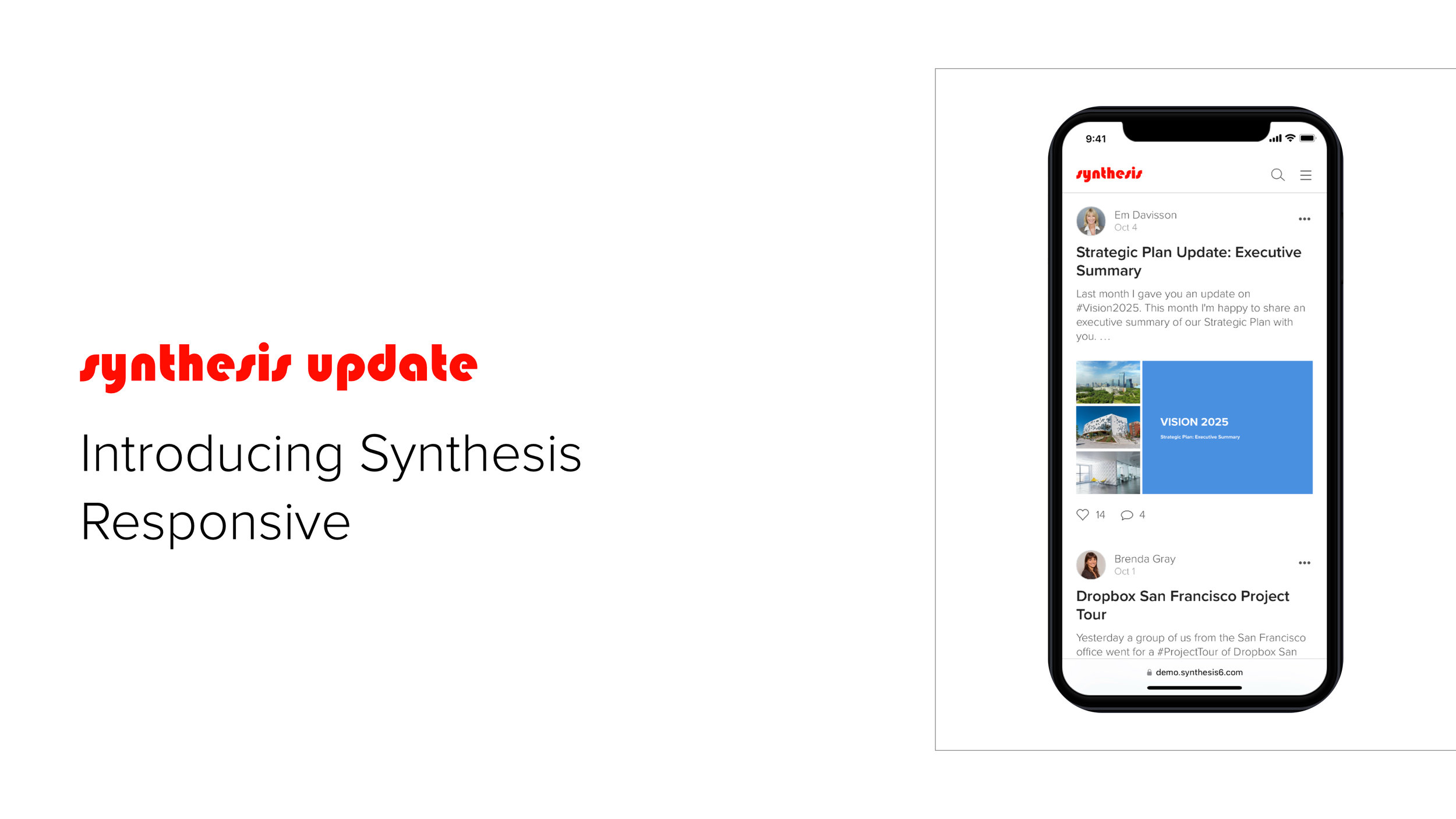
We’re excited to announce Synthesis Responsive is now available in all Synthesis 6 environments. The release of Synthesis Responsive means all end user facing content and tools are fully available on mobile phones and tablets, as well as desktop and laptop screens of all sizes.
You can access Synthesis 6 on a phone or tablet using the same URL you are currently using on your desktop or laptop.
Enjoy!

DESIGN INSPIRATION GALLERY | New Additions
Looking for intranet inspiration? We have some new additions to our Design Inspiration Gallery.
You can now explore examples in three new resource categories—Office Resources, Practice Areas, and Launch Videos.
Looking for intranet inspiration? We have some new additions to our Design Inspiration Gallery.
You can now explore examples in three new resource categories:
Office Resources
Practice Areas
Launch Videos
Office Resources
Office Resource pages help orient local and visiting employees by supplying information such as key office contacts, seating charts, wifi passwords, conference room capacities, and local hotels and restaurants.

Practice Areas
Practice Area pages provide easy access to critical information such as key contacts, codes and standards, marketing collateral, and featured projects for your firm’s market sectors, disciplines, and studios.

Launch Videos
A Launch Video is a great way to build awareness, generate excitement, and engage employees in anticipation of your new Synthesis intranet.
Suggestions, please!
Got a suggestion for something you’d like to see in the gallery? Let us know!

INTRANET TOUR | Highlights from Primera's Transition to Synthesis 6
Featured Guests
Matt Dvorak, Senior Vice President, Marketing + Communications
Nick Sternowski, Director of Operations
Summary
We’re excited to share this tour of Alma, Primera’s Synthesis 6 intranet. Your tour guide will be Matt Dvorak, Senior Vice President, Marketing & Communications, and Nick Sternowski, Director of Operations.
Featured Guests
Matt Dvorak, Senior Vice President, Marketing + Communications
Nick Sternowski, Director of Operations
Webinar Summary
Join us for an interactive tour of Alma, Primera’s Synthesis 6 intranet. Our tour guides will be Matt Dvorak, Senior Vice President, Marketing & Communications, and Nick Sternowski, Director of Operations.
Primera launched Alma to all employees on June 5th, after two months of planning and design followed by four months of building.
In this Intranet Tour, Matt and Nick will share:
Inspiring examples of intranet content and communications the Primera team built during their transition to Synthesis 6
What Primera’s users are enjoying the most about Alma
Synthesis 6 transition strategies and lessons learned
Webinar Timeline
INTRANET TOUR
00:39 Speaker Introductions
02:04 Alma 101 Video
07:35 About Primera
09:17 Why a new intranet?
TOUR
11:52 CEO’s Mid-Year Meeting Recap Post
13:55 Real Time Communications: Employee Survey
17:36 Financial Wellness Benefit Rollout
20:47 Codified Knowledge: Career Development Guides
22:00 Project Manager Training Guide
24:15 Who We Are Guide
Q+A
27:35 Q: How did you get the owners of content comfortable with posting?
26:40 Q: What percentage of your staff participate?
31:30 Example: Ask Alma Scavenger Hunt
32:16 Q: What are the resources needed to maintain the intranet?
33:38 Example: Biometric Screening Benefit Page
34:30 Q: How does the Important Dates section on the right work?
35:25 Q: What is a lesson learned from your transition?
TRANSITION APPROACH
37: 20 Introduction to the Transition Approach
38:10 Preparing High Quality Essential Content
41:16 Branding and Internal Communications
45:36 Pre-Populating the Stream
More Case Study Webinars
Register for our next Office Hours Webinar
PRODUCT UPDATE | Summer 2023
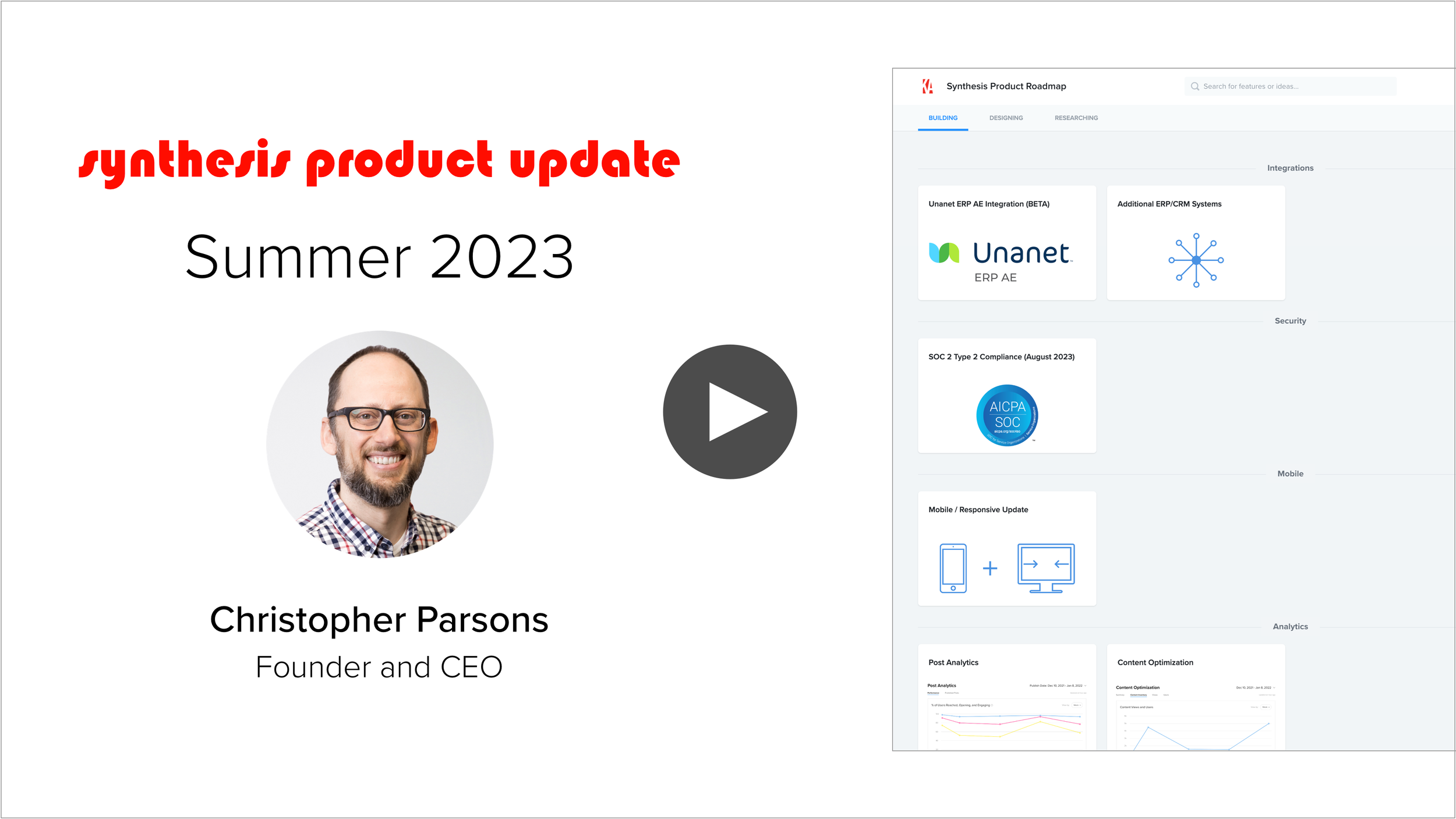
We’re really excited about the future of Synthesis and want to share what’s in progress with you. This 7-minute video will provide an overview of what we’re currently building, designing, and researching, including:
Unanet AE ERP + Additional ERP/CRM Integrations
Mobile/Responsive Updates
Post Analytics + Content Optimization
Video Captions + Transcriptions, Dark Mode, and General Accessibility Updates
Synthesis LMS
Next Generation Search + AI
Search Analytics
SOC 2 Type 2 Security Compliance
We hope our roadmap reflects your intranet hopes and dreams. As always, our roadmap is completely driven by the KA Community, so please keep the questions, feedback, and ideas coming to support@knowledge-architecture.com.
Accessing the Synthesis Product Roadmap
You have two ways to access the Synthesis Product Roadmap:
Via our website. You can find the Synthesis Product Roadmap under the Support tab on knowledge-architecture.com.
Via the Synthesis 6 Help Menu. A link to the Synthesis Product Roadmap can be found in the Synthesis 6 Help Menu.

INTRANET TOUR | Highlights from Fuscoe Engineering's Transition to Synthesis 6
Featured Guest
Brandon Norton, Multi-Media Manager, Fuscoe Engineering
Summary
We’re excited to share this tour of Arc, Fuscoe Engineering’s Synthesis 6 intranet. Your tour guide will be Brandon Norton, Multi-Media Manager and Intranet Champion.
Featured Guests
Brandon Norton, Multi-Media Manager, Fuscoe Engineering
Webinar Summary
We’re excited to share this tour of Arc, Fuscoe Engineering’s Synthesis 6 intranet. Your tour guide will be Brandon Norton, Multi-Media Manager and Intranet Champion.
Fuscoe launched the new Arc to all employees on June 5th, after serving as one of the earliest beta testers of Synthesis 6.
In this Intranet Tour, Brandon shared:
Inspiring examples of intranet content and communications that the Fuscoe team built during their transition to Synthesis 6
What Fuscoe users are enjoying the most about the new Arc
Synthesis 6 transition strategies and lessons learned
For a detailed look at ARC’s information architecture, click here.
Webinar Timeline
INTRANET TOUR
01:55 Fuscoe Engineering Overview
04:27 Arc Homepage
07:15 Visual Navigation System
08:07 Vision + Purpose Miniguide
09:22 Employee Ownership Guide
10:35 Employee Handbook Guide
12:00 HR + Office Community
13:17 Benefits Center Guide
14:41 Office Resource Pages
17:40 Job Description Pages
18:32 Projects + Practice Community
19:05 QA/QC Page + Resources
21:06 Project Directory
23:19 Standards + Codes Link Library/Guide
24:25 Technology Community
24:49 Office Equipment Miniguide
25:26 Software Applications Pages
27:40 Marketing Community
27:59 Style Guide
29:00 Templates + Collateral Library
29:45 Business Card Order Form
30:40 Learning Community
30:51 Technical Training Library + Courses
31:52 Lunch + Learn Recordings
32:29 Learning Video Library
33:29 Q: How do digital business cards work?
34:44 Q: Are assets in the Brand + Collateral Library brought in from OpenAsset?
35:30 Q: How many people were involved in the development of Arc before launch?
37:20 The Bubble Community
Q+A
38:50 Q: Do you experience information overload on your intranet homepage since all posts on the Aec are made there? Do you have guidelines and/or limitations on who can post and what they can post about?
40:58 Q: How has the new intranet been received by employees?
42:34 Q: How are you onboarding new content editors after launch?
44:36 Q: Can you please show a few examples of reinforcing the Fuscoe brand in Synthesis 6 without using Custom CSS or Javascript?
47:06 Q: How did you use Custom CSS to reinforce your brand in Synthesis 6?
48:45 Q: What percentage of your intranet content was migrated from Synthesis 5 versus created fresh in Synthesis 6?
More Case Study Webinars
Register for our next Office Hours Webinar

SAVE THE DATE | KA Connect 2024

We’re excited to announce the return of KA Connect, our annual knowledge management conference for the AEC industry.
KA Connect 2024 will take place at the Sundance Mountain Resort in Sundance, Utah from August 13th to August 16th, 2024.
We envision KA Connect 2024 as being “half conference, half camp,” with general sessions in the mornings, and a choose-your-own-adventure program comprised of breakout sessions, intranet tours, outdoor activities, and plenty of unstructured time to connect, reflect, and recharge in the afternoons.
Sundance’s location at 6,100 feet in the north fork of Provo Canyon will provide an inspiring backdrop for you to learn from and with your fellow KA Community members.
Our program will focus on sharing strategies and best practices for using knowledge management, internal communications, learning + development, and intranet programs to help your AEC firm evolve and grow.
Early registration will open this fall.
If you’ve got ideas or thoughts to share about KA Connect 2024, please send them our way.
Save the date!
IDEA LAB | Synthesis LMS
We're excited to announce that the Synthesis LMS Idea Lab is now open for submissions.
In conversation after conversation with this community we’ve heard loud and clear that improving your Learning + Development programs is consistently one of your highest business priorities.
Knowledge Architecture is embarking on a journey to bring Learning Management System (LMS) capabilities to Synthesis. For years clients have been using Synthesis to support Learning + Development programs by building “LMS Light” solutions with pages, videos, posts, and now, video libraries and guides in Synthesis 6.
We are going to advance beyond “LMS Light” by adding new capabilities to Synthesis such as courses, learning paths, and assignments, as well as the proper reporting and analytics functionality to help your firm track the progress of your learners and monitor the health of your Learning + Development programs.
The Synthesis LMS Idea Lab is the next step in our journey towards co-creating a unique and compelling LMS offering with our community that is both AEC-specific and also deeply integrated into Synthesis.
We’d love your help!

We're excited to announce that the Synthesis LMS Idea Lab is now open for submissions.
In conversation after conversation with this community we’ve heard loud and clear that improving your Learning + Development programs is consistently one of your highest business priorities.
Knowledge Architecture is embarking on a journey to bring Learning Management System (LMS) capabilities to Synthesis. For years clients have been using Synthesis to support Learning + Development programs by building “LMS Light” solutions with pages, videos, posts, and now, video libraries and guides in Synthesis 6.
We are going to advance beyond “LMS Light” by adding new capabilities to Synthesis such as courses, learning paths, and assignments, as well as the proper reporting and analytics functionality to help your firm track the progress of your learners and monitor the health of your Learning + Development programs.
The Synthesis LMS Idea Lab is the next step in our journey towards co-creating a unique and compelling LMS offering with our community that is both AEC-specific and also deeply integrated into Synthesis.
We’d love your help!
What’s an Idea Lab?
An Idea Lab is a research method we use to help us generate diverse Ideas from our client community. When we say "Ideas," we mean comments, creative or original materials, drawings, feedback, ideas, improvements, notes, plans, or other information about Knowledge Architecture, Synthesis, and/or our products (collectively, "Ideas"). Although we can't guarantee any specific Idea will be implemented, we can ensure that your Ideas will be thoughtfully considered during the Synthesis LMS design process.
How can I get involved?
To participate in the Synthesis LMS Idea Lab, simply share your Ideas for how you would like to see your learning resources (collectively, "Your Content") laid out or configured in Synthesis LMS. We're happy to look at mockups, videos, slide presentations, written descriptions, or whatever vehicle you believe best relays your Idea(s). Your firm can submit as many Ideas as you like, from as many different authors or teams as you like.
We welcome all Ideas, so please do not fixate on creating perfect quality Idea submissions. If you want to do pixel-perfect mockups in Sketch, Illustrator, or Photoshop, wonderful. If you want to share your Ideas using simple tools like Balsamiq, PowerPoint, or good old pen and paper, that's also great. We’d also love to see videos made with Loom, Zoom, Teams, or even your phone. The most important thing to us is understanding the intention of your Idea.
How do I get started?
Here are several design prompts to consider:
If I could create the ideal learning environment for our employees using Synthesis, what would that look like? What would they be able to find and where would they find it? How would Synthesis LMS help them learn about our company’s values, standards, and policies, develop their skills, and advance their careers?
If I could imagine the ideal teaching/facilitation environment for our subject matter experts, what would that look like? What would they be able to learn about how effective their learning content is being distributed and absorbed? What kind of interactions would they have with learners via Synthesis LMS? How would they build learning experiences using the LMS and what kind of experiences would they build?
If I could imagine the ideal administration environment for our Learning + Development team, what would that look like? How would they identify, organize, assign, and monitor courses? How would they orchestrate our learners, teachers, outside experts, internal and external resources and more? How would they understand the effectiveness of our L+D program?
If you currently have an LMS, where are you running into friction? What would you like to see in Synthesis LMS that would help you better accomplish your goals?
If you currently have a Corporate University or Academy, how would you imagine Synthesis LMS supporting it?
Submit your Ideas by August 31st!
We will be collecting your Ideas between July 13th and August 31st, 2023.
How to Submit your Idea
We are using Submittable to track submissions for the Synthesis LMS Idea Lab. Login using your existing Submittable account or create a new account using the button below.
Questions about the Synthesis LMS Idea Lab?
Please send any questions about the Synthesis LMS Idea Lab to support@knowledge-architecture.com.
The Design Inspiration Gallery is Live!
We know that designing a new page, guide, or community from scratch can be intimidating.
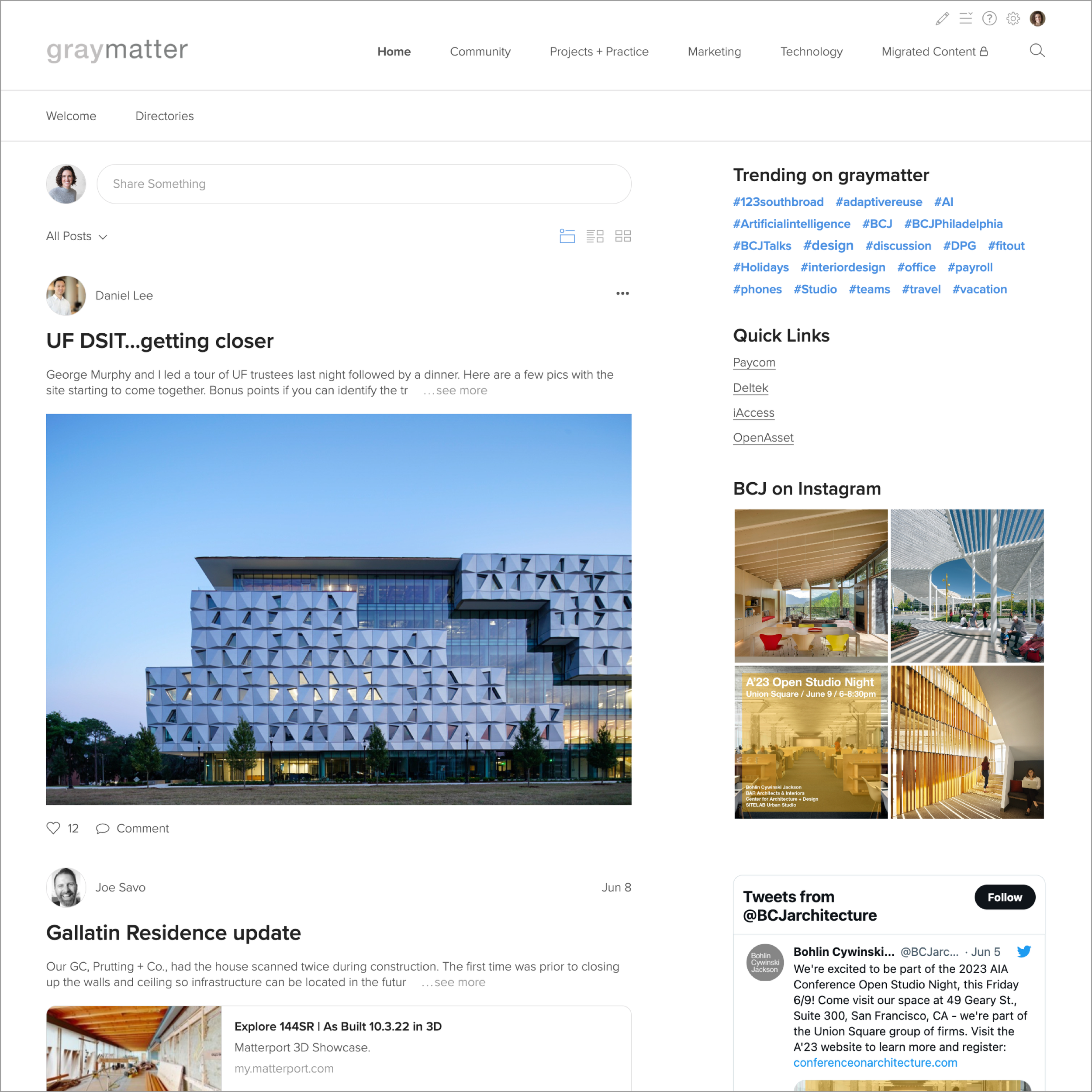
That’s why we created the Design Inspiration Gallery. The Design Inspiration Gallery will help you jump start your Synthesis Intranet design (or redesign) process with inspiring examples from your peers in the KA Community.
We’re launching DIG with three resource categories: Home Pages, Style Guides, and Benefit Centers, and will be adding new categories and examples each month.
DIG is now live and ready for you to explore. Enjoy!
We know that designing a new page, guide, or community from scratch can be intimidating.
That’s why we created the Design Inspiration Gallery. The Design Inspiration Gallery will help you jump start your Synthesis Intranet design (or redesign) process with inspiring examples from your peers in the KA Community.
We’re launching with three resource categories: Home Pages, Style Guides, and Benefit Centers, and will be adding new categories and examples each month.
The Design Inspiration Gallery is now live and ready for you to explore. Enjoy!

Home Pages
Your employees first impressions of your Synthesis Intranet start with the home page.

Style Guides
Communicating your firm’s graphic standards — such as logo usage, color palettes, fonts, and templates — helps your employees consistently represent your brand.

Benefit Centers
Employees at any firm need access to information about the benefits offered by their employers, from medical insurance to cell phone stipends. Here are a few examples of ways content managers and HR teams have approached organizing this essential content.
Suggestions, please!
Got a suggestion for something you’d like to see in the gallery? Let us know!

INTRANET TOUR | Highlights from Moody Nolan's Transition to Synthesis 6
Featured Guests
Brian Alting, Principal, Director of Technology, Moody Nolan
Nick Bower, Director of Design Technology, Moody Nolan
Summary
We’re excited to share this tour of The Mood, Moody Nolan’s Synthesis 6 intranet. Your tour guides will be Brian Alting, Principal and Directory of Technology, and Nick Bower, Director of Design Technology.
Featured Guests
Brian Alting, Principal, Director of Technology, Moody Nolan
Nick Bower, Director of Design Technology, Moody Nolan
Webinar Summary
We’re excited to share this tour of The Mood, Moody Nolan’s Synthesis 6 intranet. Your tour guides will be Brian Alting, Principal and Directory of Technology, and Nick Bower, Director of Design Technology.
Moody Nolan launched the new Mood to all employees on May 2nd, after a roughly six month transition effort.
In this Intranet Tour, Brian and Nick share:
Inspiring examples of intranet content and communications that Brian, Nick, and the Moody Nolan team built during their transition to Synthesis 6
What Moody Nolan users are enjoying the most about the new Mood
Synthesis 6 transition strategies and lessons learned
For a detailed look at The Mood’s information architecture, click here.
Webinar Timeline
INTRANET TOUR
01:45 Moody Nolan Overview
02:30 The Mood Communities Overview
03:10 Office: Forms Library
04:00 Communications Community
05:08 MoodCheck Staff Meeting Guide
05:44 Practices Community
06:25 Housing Practice Pages
07:27 Housing Onboarding & Standards
07:45 Learning Community
08:18 Professional Development Series
10:30 PD Series Video Library
11:20 Quarterly Summits
11:55 Learning Courses Guide + Moodle LMS
13:20 Learning Badges
PROCESS
14:55 Process: Transition Timeline Overview
16:22 Administrator Onboarding
18:25 Content Migration
19:40 Onboarding Content Managers
23:10 Intranet Branding and Standards
25:00 Firmwide Launch Announcement
26:35 Cut Over
27:40 Continuous Improvement
Q+A
28:50 Q: How did you connect Moodle, your LMS, to the intranet?
30:50 Q: How do people "sign-up" or gain access to the learning opportunities? Are they virtual or all in-person? If they are virtual, do you put the calendar invites on The Mood for folks to download or does that process happen outside of your intranet?
35:45 Q: How are community managers selected and what do you expect of them?
36:21 Q: How do you decide if a lift-and-shift or a redesign is right for your firm?
40:35 Q: How do you determine where content lives if it is relevant in multiple locations?
41:40 Example: Cross referencing Vantagepoint in multiple locations
WRITE IN Q+A
Q: How do you track staff AIA credits from your Professional Development Series?
A: All of the AIA credits are managed outside of the intranet. We have a few employees that manage that side of things.
Q: Who creates the PD series videos?
A: The PD Series is all done through Microsoft Teams Live Events. Those are automatically recorded, so we take the recordings and upload them to the intranet.
Q: Do you have many Community Managers? One from each office? Looking for some ideas on how many people have their hands in creating/editing content.
A: We have a lot of community managers. I would say we have upwards of 20. We have it based more on the information that person can offer. So marketing, finance, tech, etc.
Q: How do you determine if you're better off with the "lift and shift" approach or re-building from scratch?
A: The content outliner makes it easy to move things around. We went with a fairly blank framework and then just moved info to the respective location.
Q: Nick Bower mentioned the content outliner as an invaluable tool. What is that?
A: It is the primary tool you use to create, organize, and manage content in S6. This video shows the Content Outliner in action.
Q: What would you say was the longest/hardest part of the transition? How did you structure your agenda for the process?
A: Honestly, the entire process was pretty painless. There are so many great features.
Q: Who are the content managers, how are they selected, were there any challenges in having staff carve out time to develop their pages?
A: The content managers are all across the company. We basically identify the correct person who both has the information and will work on the intranet actively.
Q: Can you demonstrate building a new page? I'm interested in seeing how improved the UX is!
A: I don’t think Brian and Nick will have time to do this on the webinar, but this video shows the content creation tools in action.
Q: Being a multi-office firm, do you share your proposals and opportunities on the intranet, similar to the directory format? If so, can you show us how that is displayed?
A: Currently we do not share proposals and other things like that, but it is a conversation we are starting to have—to see what value that may bring to the intranet.
More Case Study Webinars
Register for our next Office Hours Webinar
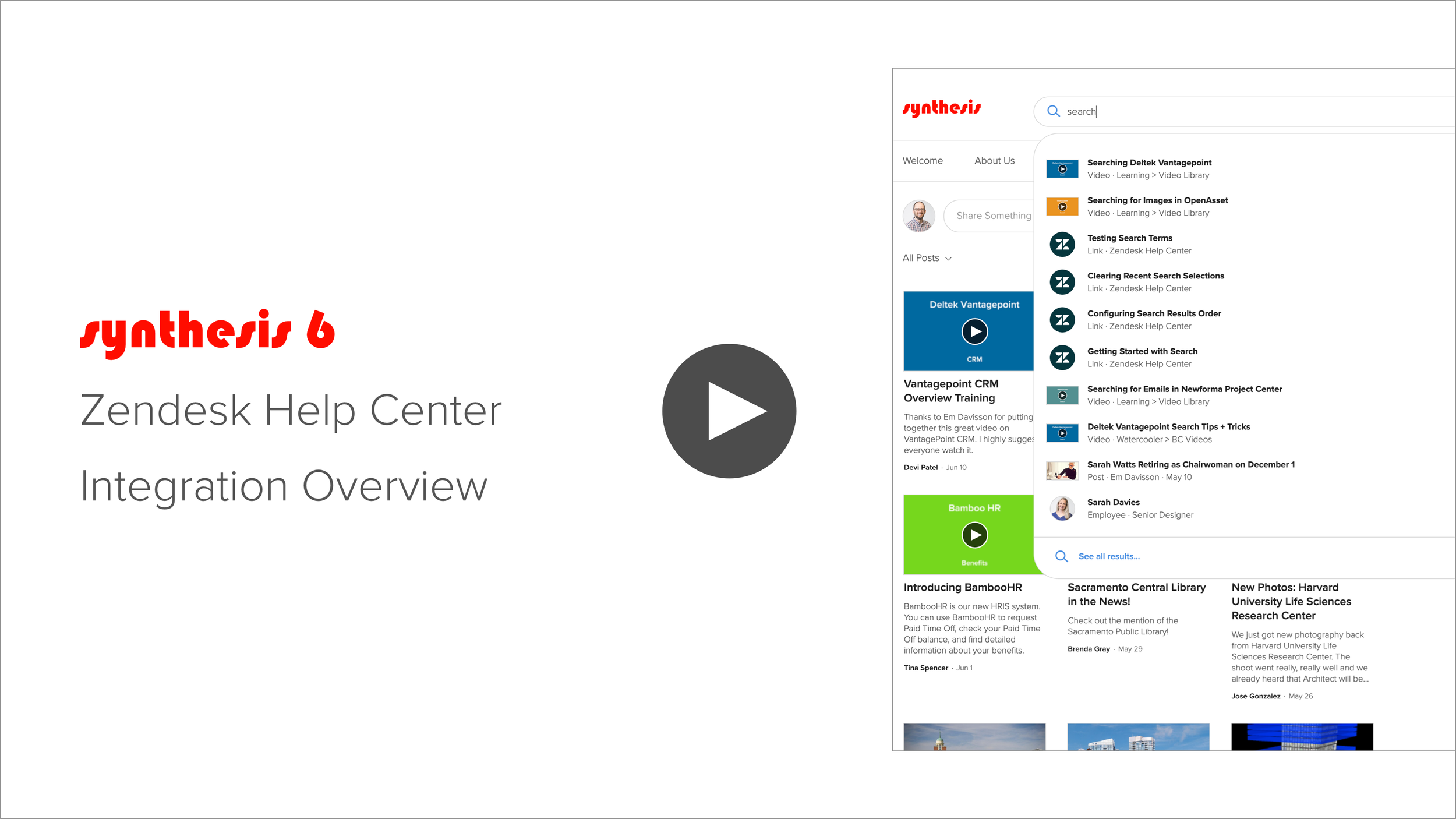
Introducing Zendesk Help Center Integration
We built this integration because several of our clients have created Information Technology and/or Design Technology articles in their Zendesk Help Centers. They want those articles to appear when their end users go to create new support tickets or to be available in Zendesk Chat.
That said, our clients using Zendesk would also like for that content to be available in Synthesis Search. Our intention with this integration is to give our clients using Zendesk the best of both worlds.
Once enabled, Synthesis will index articles in your Zendesk Help Center and return them in Synthesis Search Results as External Links.
If you’d like to integrate your Synthesis 6 Intranet with your Zendesk Help Center, just reach out to us at support@knowledge-architecture.com and we’ll get you started.
Enjoy!

INTRANET TOUR | Highlights from AE2S's Transition to Synthesis 6
Featured Guests
Sue Hass, Marketing Manager at AE2S
Summary
We’re excited to share this tour of Drop, AE2S’s Synthesis 6 intranet. Your tour guide will be Sue Hass, Marketing Manager and Intranet Champion.
Featured Guests
Sue Hass, Marketing Manager at AE2S
Webinar Summary
We’re excited to share this tour of Drop, AE2S’s Synthesis 6 intranet. Your tour guide will be Sue Hass, Marketing Manager and Intranet Champion.
AE2S launched the new Drop to all employees on March 29th, after a roughly four month transition effort.
In this Intranet Tour, Sue shares:
Inspiring examples of intranet content and communications that Sue and the AE2S team built during their transition to Synthesis 6
What AE2S users are enjoying the most about the new Drop
Synthesis 6 transition strategies and lessons learned
A “cheat sheet” they created to help content editors determine the best Synthesis 6 tool for their content needs. You can download it here.
Webinar Timeline
INTRANET TOUR
01:50 Overview of Communities
02:20 Home: Drop 101, Office Locations, Company History, ESOP Guide
05:00 Practice: Instrumentation & Controls Knowledge Base Guide, I&C Posts
06:20 Project Management Manual Guide
07:23 CAD Manual Guide
08:30 Proposal Archive Document Library
10:00 Presentation Archive Document Library
10:35 Employee Directory: Licensed Professionals View
11:25 Employee Block: Certified Drone Pilots
11:55 Project Directory: Filtered Views Smart Nav Block
13:20 Project Directory: Map View
14:30 Project Directory: Filtered View Links
14:55 Search Optimization: Best Bets
15:25 Branding
TRANSITION PROCESS
16:39 Introduction to Process
17:40 Transition Timeline Overview
19:00 Navigation
20:45 Onboarding
21:30 Migrating Content
23:30 Redesign vs Lift and Shift
24:25 Which Tools to Use When
25:50 Onboarding Content Editors (Post Launch)
27:30 Managing Content During the Transition}
29:50 Employee Training (Post Launch)
30:45 Re-Launch Communications
QUESTIONS
34:30 How does your team use the Proposal Archive and Presentation Library? Are the files also saved on SharePoint?
36:20 How did you get your content managers to think about the new features and reorganize their content with them in a new way?
37:30 How many people did you have managing the site pre-transition, during transition, and now?
39:15 Which projects do you show on the intranet and who manages that information?
40:32 Do you have a sense of what project information employees are finding most valuable?
41:30 Where did the ESOP calculator come from?
42:00 Did you do any tree testing of your information architecture?
42:10 How are you using the stream and how are you managing that content?
More Case Study Webinars
Register for our next Office Hours Webinar

SYNTHESIS SPOTLIGHT | Sharing Best Practices and Process Knowledge @ Bora
Featured Guests
Corey Squire, Director of Sustainability at Bora
Summary
Knowledge management is key to unlocking success with sustainable design, but designers live in a noisy world filled with conflicting priorities. By taking the time to capture and share “what good looks like”—in other words, to separate the signal from the noise—a firm can provide its designers with a solid baseline for designing projects.
Featured Guests
Corey Squire, Director of Sustainability at Bora
Webinar Summary
Knowledge management is key to unlocking success with sustainable design, but designers live in a noisy world filled with conflicting priorities. By taking the time to capture and share “what good looks like”—in other words, to separate the signal from the noise—a firm can provide its designers with a solid baseline for designing projects.
This pursuit to deliver better project outcomes led Bora’s Director of Sustainability, Corey Squire, to build and launch Chaco, the firm’s Synthesis 6 intranet. Through the sharing of best practices and process knowledge—information staff “can’t find anywhere else”—Chaco is helping Bora embrace the firm’s core design philosophies of health, climate and equity while transforming the design process.
In this Synthesis Spotlight, you’ll learn how Chaco allows Bora’s designers to:
Find best practices for building typologies, systems, materials, construction, and specifications
Use process knowledge ranging from pre-design, design, products + materials, client feedback, and archiving in their projects
Ask questions and get answers from other designers around a variety of design and technical topics
Continuously improve Bora’s knowledge base as the firm evolves and grows
Webinar Timeline
INTRODUCTION
01:12 Introduction to Bora
02:50 Knowledge Management Challenges
04:58 Broad Overview of Chaco
BEST PRACTICES
06:20 Vision → Outcome → Strategy → Documentation
08:58 The Meaning of “Best Practices” at Bora
10:55 Bora Best Practices vs Standard Best Practices
12:17 The Bora Perfect Project
14:25 Best Practices by Typology
16:33 Interior Construction / Wall Finishes
19:45 Best Practices by Division
21:05 Best Practices Posts + Hashtags
PROCESS
22:34 Process Overview
24:30 Project Start Up
26:06 Environmental Graphic Design
27:16 Contextual Research
27:45 Performance Requirements
28:40 Volta Indoor Air Quality
30:13 Connecting Tools and Resources to Explanations
30:35 Sample Drawing Set
34:35 Construction Administration Guide
35:40 Process Posts + Hashtags
36:40 Post: Joint Sealant Question
PROJECTS
38:00 2030 Dashboard Directory View
39:34 Performance Metrics on Project Profiles
40:36 Projects by Glazing Area Directory View
QUESTIONS
41:43 How will you make sure your best practices don’t go stale?
45:18 How do you enforce best practices?
47:20 Start with the Firm Vision / Mission
49:10 How do you find the time to maintain intranet content?
51:38 How was your intranet content developed? How much time did it take?
55:55 What’s next for Chaco?
More Case Study Webinars
Register for our next Office Hours Webinar
What's New in Synthesis 6?
Synthesis 6, our next generation intranet platform for architects and engineers, is now available.
While we have designed Synthesis 6 to continue helping AEC firms find, share, and manage knowledge, we have focused on doing so in a more simplified, intuitive, and cloud-based way.
Synthesis 6, our next generation intranet platform for architects and engineers, is now available.
While we have designed Synthesis 6 to continue helping AEC firms find, share, and manage knowledge, we have focused on doing so in a more simplified, intuitive, and cloud-based way.
You can look forward to:
Navigating your intranet more easily with the new mega menu, breadcrumb, and navigation block features
Building pages that are beautiful, fun to create, and easy to maintain with new image and document blocks, page templates, and drag-and-drop functionality
Authoring, organizing, and managing essential content with the new content outliner, community layouts, and guides
Managing large collections of knowledge with new grid layouts, saved views, and sorting, filtering, and grouping tools in our reimagined libraries and directories
Providing brand consistency by customizing colors, fonts, and logos with our new style and branding tools
Here are some of the features we’re most excited about, and we think you will be too!
Navigation > Mega Menu
The new mega menu feature makes it easy to quickly find what you’re looking for across the intranet.

Navigation > Breadcrumbs
The new breadcrumb feature shows you where you are at all times.

Navigation > Navigation Blocks
Navigation blocks use graphics, titles, and/or descriptions to connect users to internal and external resources.
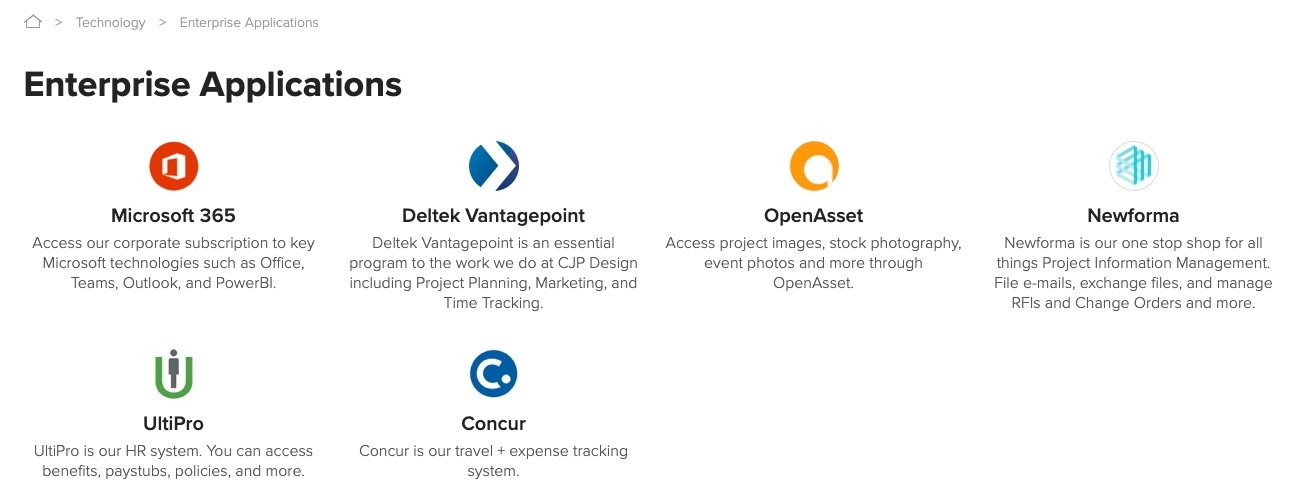
Pages > Page Templates
Content creators can select one of our pre-designed page templates to get started on building a page quickly. Your firm can also create custom page templates specific to your firm’s needs.

Pages > Drafts
Create new intranet content in private with our drafts feature. Drafts are hidden from end users until the content creator is ready to publish.

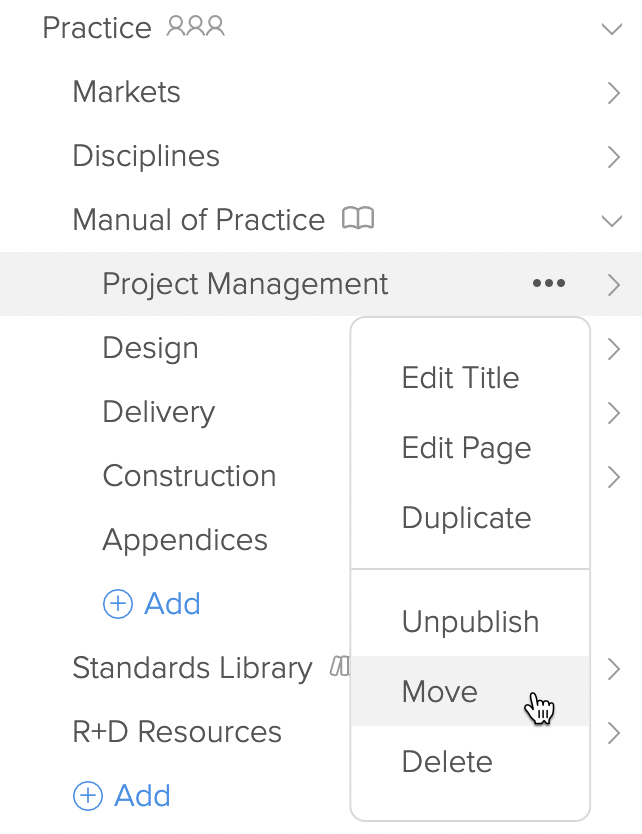
Pages > Move
Easily relocate resources as your business changes.
Pages > Content Blocks
Content blocks provide a variety of options to help content creators build visually compelling pages.

Pages > Document and Video Blocks
Add a collection of documents or videos to your page using our blocks. You can choose between a variety of layouts and layout sizes.

Pages > Guides
Guides empower content creators to modernize handbooks and manuals into living resources for employees. Guides display a hierarchical structure on the right of every guide page, so employees can easily transition from section to section.

Libraries > Document and Video
Document and video libraries include auto-generated thumbnail previews, the ability to add custom metadata (i.e. event, topic, application), and use that metadata to sort, filter, and group resources.

Directories > Employees
Employee directories have been upgraded to include a grid layout, improved sorting, filtering, and grouping, saved views, and our new hover card.

Directories > Projects
Project directories now have a grid layout, more powerful sorting, filtering, and grouping, saved views, and an interactive project map.

Branding > Style Editor
Branding and style tools promote brand consistency by allowing your firm to customize the colors, fonts, and logos of your intranet.

Want to learn more about Synthesis 6?
Drop us a line at info@knowledge-architecture.com.
Launching Synthesis 6 Beta
We are very excited to announce Knowledge Architecture is right on schedule with Synthesis 6 and will be launching into beta next week!
Beta will be rolled out in three phases, with a different focus during each phase:
Beta 1: Essential Content and Information Architecture
Beta 2: Internal Communications
Beta 3: Preparing for General Availability
Beta participants and Knowledge Architecture will collaborate to reach general availability in the second half of the year with Synthesis 6 in tip-top shape.
Together we will be focusing on four main goals:
Goal 1: Learn how to create valuable content with Synthesis 6
Goal 2: Validate and refine product design
Goal 3: Fix technical bugs
Goal 4: Improve performance
We will start small and add participants during each beta phase. If you’d like to learn more about the Synthesis 6 beta rollout, please contact your Client Success Manager. We’re looking forward to hearing from you!
About Synthesis 6
While we have designed Synthesis 6 to continue helping AEC firms find, share, and manage knowledge, we have focused on doing so in a more simplified, intuitive, and cloud-based way.
This video will show you some of the things about Synthesis 6 we’re most excited about.
Navigating your intranet more easily with the new mega menu, breadcrumb, and navigation block features
Building pages that are beautiful, fun to create, and easy to maintain with new image and document blocks, page templates, and drag-and-drop functionality
Authoring, organizing, and managing essential content with the new content outliner, community layouts, and guides
Managing large collections of knowledge with new grid layouts, saved views, and sorting, filtering, and grouping tools in our reimagined libraries and directories
Providing brand consistency by customizing colors, fonts, and logos with our new style and branding tools

Information Architecture Playbook
If the term “information architecture” is new to you, think of it as the navigation structure on your intranet. Effective information architecture makes it easy for employees to find what they’re looking for.
This playbook is designed to help you understand your intranet’s current information architecture and make improvements as needed. We’ve broken this process into 5 steps, some of which will be completed by Knowledge Architecture, and others that will be completed by your team. Each step is described in detail below. We look forward to partnering with you on your new information architecture.

If the term “information architecture” is new to you, think of it as the navigation structure on your intranet. Effective information architecture makes it easy for employees to find what they’re looking for.
This playbook is designed to help you understand your intranet’s current information architecture and make improvements as needed. We’ve broken this process into 5 steps, some of which will be completed by Knowledge Architecture, and others that will be completed by your team. Each step is described in detail below. We look forward to partnering with you on your new information architecture.
Step 1: Review your Current State
When you're ready to get started, your Knowledge Architecture team will generate a snapshot of the current state of your intranet’s information architecture. This reference point will empower you and your team to take what works from your existing information architecture, and leave what doesn’t behind.
We’ll provide your current state snapshot to you in an interactive outline hosted on Dynalist. It will contain your intranet’s Tier 1, 2, and 3 navigation items.
Tier 1 items are the items visible on your intranet’s top navigation. (e.g. Home, People, Projects, etc.)
Tier 2 & 3 items are typically the headers and links on the left navigation of your intranet, but may also include content that appears on the community landing page or wiki pages on your intranet. We do not recommend going more than 3 layers deep at this stage.
Here is a section from a current state information architecture draft with Tier 1, 2, and 3 items identified.

Your Knowledge Architecture team will share this snapshot with you, answer questions, and support you in revising it if needed.
Contact your Client Success Manager or support@knowledge-architecture.com to get started.
Step 2: Review IA Templates
If your intranet transition will be a “Lift and Shift” of your current information architecture, skip Steps 2 and 3 and move on to Step 4.
Some intranet teams would like to use the transition to Synthesis 6 as an opportunity to address navigation pain points, reorganize the intranet completely, or something in between. If this is the case, then you have important decisions to make:
Is your current information architecture the right starting place, or do you need a completely different structure?
If you do need a completely different structure, what should that structure be?
It can be hard to know what good looks like for an information architecture because different people find information in different ways. A navigation structure that works for one set of users may not work for another, which can leave intranet teams in a difficult place when it comes to reorganizing content. However, if we look across enough users, patterns tend to emerge. Surfacing these patterns allows information architecture conversations to be less about one person being right or wrong and more about what works for the majority of users. Of course, this requires research.
Knowledge Architecture has completed quantitative and qualitative information architecture research with 600+ AEC users to identify navigation paths that get users to critical information quickly. We’ve combined this research with our experience supporting 130+ AEC intranets to create two information architecture templates. These information architectures were tested with architects, engineers, new employees, and seasoned professionals on a mock Synthesis 6 intranet, which means the research subjects were able to interact with mega menus and other new user-interface elements that didn’t exist in previous versions of Synthesis.
In this step you’ll review these templates to determine if either is a good fit to use as the starting point for your intranet’s new information architecture. If neither are a good fit, then we will use your current state as the starting point and inject best practices from Knowledge Architecture’s templates when applicable.
Template 1: Essentials

The Essentials information architecture is simple, complete, and flexible. It is a strong foundation that can be added to over time.
Essentials is designed for a firm with one or two primary offices and one or two primary disciplines. For example, an architecture firm that also provides planning and interior design with headquarters in Chicago and a handful of satellite offices across Illinois and Wisconsin.
Template 2: Essentials Plus

The Essentials Plus information architecture supports users who need company wide information, regional information, and information specific to their discipline.
Essentials Plus is designed for a firm with many offices and many disciplines. For example, a firm that provides architecture, engineering, and surveying with offices in Chicago, Denver, Austin, Raleigh, and Albany and a dozen satellite offices.
Step 3: Pick your Starting Point
Which of these three options (Essentials, Essentials Plus, or your current state) would you like to use as the starting point for your new intranet’s information architecture?
Once you’ve answered this question, your Knowledge Architecture team will provide you with a Dynalist version of your starting point information architecture for you to develop into your future state.
Step 4: Design your Future State
In this step you’ll adjust your starting point information architecture to meet your organization's needs. You’ll adapt your starting point information architecture in Dynalist by:
1. Removing content that doesn’t need to be migrated because it is redundant, outdated, trivial, or irrelevant (ROTI).
Redundant - Content that is listed in multiple places. Each piece of content should only appear in one location on the information architecture initially. This will be it’s primary location. If needed, additional links to this content will be added in the next step.
Outdated - Content that has been superseded
Trivial - Content that is not worth the investment to maintain
Irrelevant - Content that doesn’t apply to your organization’s current structure or needs
2. Adding content that is missing.
If you are working with one of Knowledge Architecture’s templates, cross reference the template against your current state. Copy items from your current state that aren’t ROTI to an appropriate location in the template.
If high priority essential content is missing from your information architecture, now is the time to add it. If you are working with your current state as your starting place, explore the Knowledge Architecture templates. You may find helpful navigation structures for your missing essential content there.
3. Identifying Private Communities. If there are communities that will have secure content that only a fraction of employees should have access to, identify these communities as “Private.” An example of a Private community might be a Leadership community containing sensitive content.
4. Identifying content that needs to be referenced in multiple places. There are times when it is helpful for content to appear in two areas of the information architecture. When this is the case, add links to that content in the information architecture and label these secondary locations as “Link”.
5. Ensuring important Tier 1 items will be visible to users. With Synthesis 6’s out of the box fonts and font size, you will generally be able to view seven to eight Tier 1 items across the top of your intranet. Here is an example of an information architecture with seven items in Synthesis 6:

However, you may lose real estate if you intend to:
Increase the font size
Have long Tier 1 names
If there are too many Tier 1 items to display, the additional items will be accessible via an ellipsis at the far right of the navigation. Private communities will only be visible to users who have permission to see them.

6. Evaluating the quantity of Tier 2 items do you have in each Tier 1 category. With Synthesis 6’s out of the box fonts and font size, you will generally be able to view five Tier 2 items in one mega menu. The HR + Office example below is a Tier 1 category that has with five Tier 2 items:

If there are too many Tier 2 items to display, the additional items will be accessible via an ellipsis at the far right of the navigation. While most Tier 2 items will be pages, which don’t have unique permissions, communities can be Tier 2 items as well. Private communities will only be visible in navigation to users who have permission to see them.

7. Evaluating the quantity of Tier 3 items do you have in each Tier 2 category? The number of Tier 3 items you'll be able to see will vary based on the height of your browser window. The taller the window, the more items you'll be able to see. That said, you will generally be able to view twelve Tier 3 items in one mega menu with Synthesis 6’s out of the box font, font size, and a browser sized for full screen on a laptop. To see additional items, the user will be able to scroll down.
The Design Technology category below is an example of a Tier 2 category with more than twelve Tier 3 items:

Step 5: Build and Revise
When your Synthesis 6 environment is deployed, you or your Knowledge Architecture team will build out your intranet’s shell based on the information architecture you’ve created in Dynalist.
Once you see your information architecture in the context of Synthesis 6, you may want to make adjustments to item titles, item order, etc. The content outliner allows you to quickly rename pages and drag and drop content, so it will be easy to revise your information architecture as needed in Synthesis 6.
When you’re comfortable with the information architecture as it appears in the shell, it’s time to invite end users to see the shell and react. Your Knowledge Architecture team can advise you on methods for collecting feedback based on your firm’s needs and your information architecture’s complexity.
Wrap Up
We look forward to partnering with you on your new information architecture. Contact your Client Success Manager or support@knowledge-architecture.com to get started.

SYNTHESIS SPOTLIGHT | Fostering Community at Ballinger, LMN, and Shive-Hattery
Featured Guests
Christine Larsen, Director of Marketing at Ballinger
Kristen Riley, Employee Experience Manager at LMN Architects
Amy Anderson, Marketing Information Systems at Shive-Hattery
Summary
In this Synthesis Spotlight, you’ll hear from two intranet champions who are fundamentally reorganizing their firm’s intranet to better support business needs.

Featured Guests
Christine Larsen, Director of Marketing at Ballinger
Kristen Riley, Employee Experience Manager at LMN Architects
Amy Anderson, Marketing Information Systems at Shive-Hattery
Webinar Summary
In this Synthesis Spotlight, you’ll hear from intranet champions who are using their Synthesis intranet to foster community in a variety of ways.
Webinar Timeline
00:09 Introductions
00:51 Christine Larsen - B-Engaged at Ballinger
01:40 About Ballinger
02:29 Main Programs: SPARK, Community Design Collaborative, Habitat for Humanity
05:46 How it Works
06:47 Promoting In-Person Events
07:41 Promoting Virtual Events
08:53 2020 Thanksgiving Cookbook
10:02 Social Responsibility + Professional Growth
11:22 Kristen Riley - DEI at LMN Architects
12:24 About LMN
13:09 DEI as a Community
14:53 Adjusting to Work from Home
16:25 Staff Engagement on Current Events
17:13 DEI Resources on the Intranet
18:24 #CommunityCaresSeries
20:21 Posts from Multiple Authors
20:56 Amy Anderson - Growth Summit at Shive-Hattery
21:47 About Shive-Hattery
22:00 Growth Summit Introduced
22:51 Shifting + Expanding into a Virtual Summit
24:14 Selecting Your Session
25:47 Session Agendas Using the Strategic Choice Cascade format
26:35 Ground Rules for Sessions
27:24 The Session Experience + Feedback
28:42 Looking Forward
29:52 Q+A
30:14 Are employees being paid for their time participating in B:Engaged events? (Christine)
31:36 How does the DEI group vet communications? (Kristen)
32:24 Was your entire event setup and conducted in Synthesis? (Amy)
32:58 Was there resistance on grounds of ‘Zoom Fatigue’? (Amy)
33:40 How large is Ballinger? (Christine)
34:02 Concern over having not enough or too many people participating in sessions? (Amy)
34:48 How was the event promoted on the intranet? (Amy)
35:26 What DEI conversations have gained the most traction? (Kristen)
36:38 How are new employees introduced to B-Engaged? (Christine)
37:13 Are there talks of evolving your ‘swarming’ events with practice groups? (Amy)
39:04 How do you mentor younger staff interested in the Community Design Collaborative? (Christine)
39:57 Is formal DEI training still happening? (Kristen)
41:03 Have you changed the way your intranet supports future events + goals based on what you’ve learned? (All)
42:49 What are your thoughts on confirmation emails w/.ics files vs. downloading an .ics file for selecting + joining events? (Amy)
45:06 Where do you see your intranets + these initiatives in 5 years time? (All)
47:15 Does your staff use the Synthesis Mobile app? (All)
48:26 What’s your advice for someone starting community building today? (All)
50:16 What’s the most fun part of community work? (All)
51:21 What did you learn about community work during the pandemic that you didn’t know coming in? (All)
About Office Hours
Office Hours is 60 minutes of news, stories, and Q+A with Susan, Sarah, Chris, and special guests from the KA Advance community. You can watch recordings of past Office Hours webinars here.
More Office Hours Webinars
Register for our next Office Hours Webinar
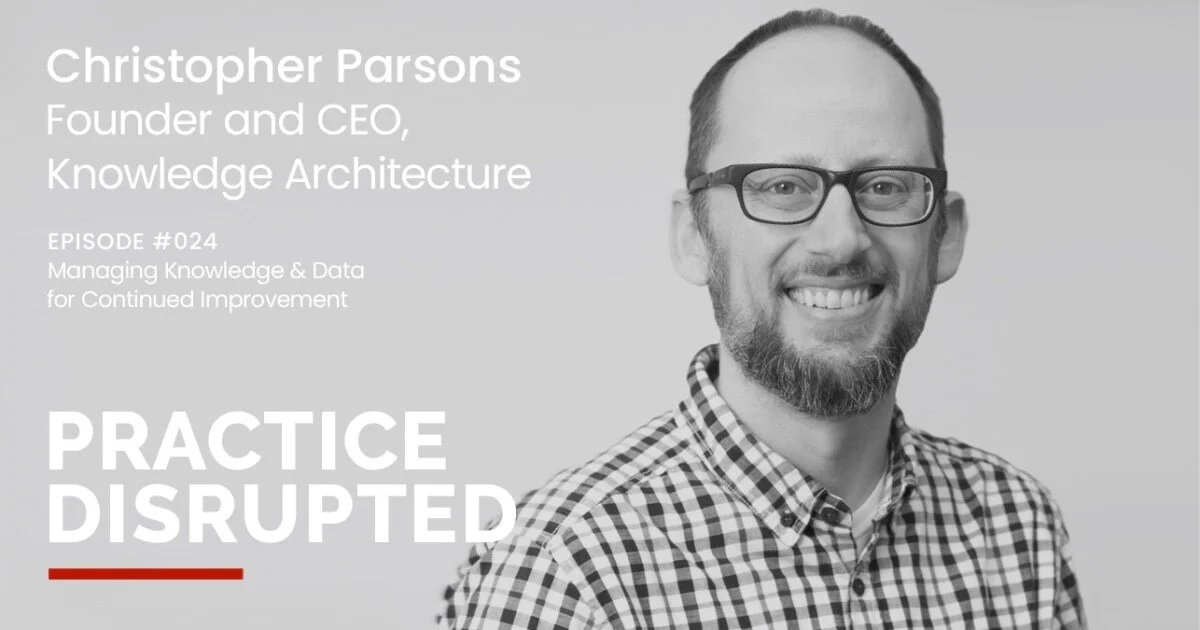
Podcast Interview: Christopher Parsons on Managing Knowledge & Data for Continued Improvement
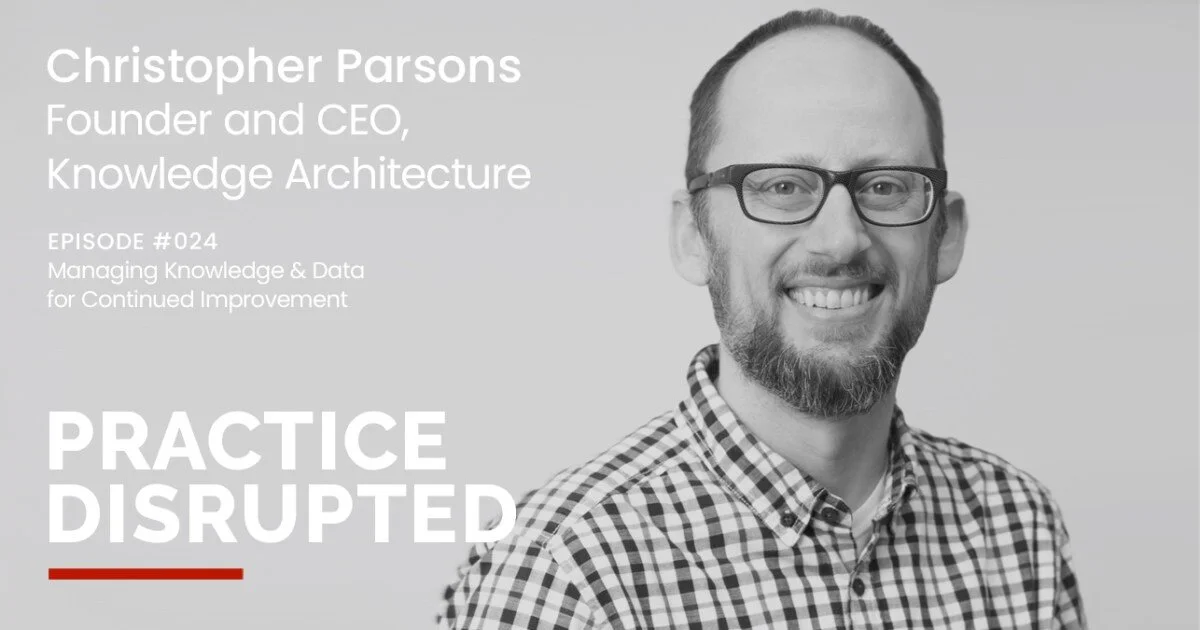
Christopher Parsons, our Founder and CEO, was featured in episode 24 of the Practice Disrupted podcast this week.
Practice Disrupted explores “how technology, cultural shifts, and emerging best practices are prompting firm owners to assess their business models and make adjustments in their studios. Each episode features an industry leader, and together our hosts will explore the new frontier of architectural practice.”
The whole series is great and we hope you check it out.

Synthesis Spotlight: Intranet Reorganizations at Lochner and BWBR
Featured Guests
Hillary Schlehuber, Senior Associate and Marketing Communications Manager at Lochner
Stefnee Trzpuc, Principal and Operations Leader at BWBR
Summary
In this Synthesis Spotlight, you’ll hear from two intranet champions who are fundamentally reorganizing their firm’s intranet to better support business needs.

Featured Guests
Hillary Schlehuber, Senior Associate and Marketing Communications Manager at Lochner
Stefnee Trzpuc, Principal and Operations Leader at BWBR
Webinar Summary
In this Synthesis Spotlight, you’ll hear from two intranet champions who are fundamentally reorganizing their firm’s intranet to better support business needs.
Webinar Timeline
02:12 Hillary Schlehuber - Lochner
03:04 Renovating LochNET
03:34 Background on Lochner
04:17 5 years of LochNET
04:49 Why a renovation?
05:41 Getting going and goals
06:25 Content ownership structure shift
07:04 Key Points in the Journey
07:14 … Acknowledging the baseline
09:04 … Recalibrating expectations
10:34 … Inventory + Renovation
12:11 HR Center Renovation
12:30 … Acknowledging the baseline
15:05 … Content inventory
16:10 … A user friendly information architecture
17:47 … The new HR Center
19:15 … How we did it
19:51 Content Spotlight: Client Managers
20:14 Content Spotlight: “For Marketers”
20:44 How renovations were rolled out
21:50 What users are saying
23:05 Hillary’s professional growth
25:17 Stefnee Trzpuc - BWBR
26:22 BWBR’s intranet history
28:00 Redesign goals
30:06 The organizational accountability chart
30:42 … Business units
31:32 … Key components of each unit
32:10 … Integrating the employee experience
32:50 … What happens in the business
33:18 Connecting the organizational strategy to the intranet
33:32 Rebranding: BHive
34:18 … Communicating to staff
34:45 … Restructuring communities
35:40 … Elevating Technology resources
36:17 … Reclaiming the Office community
36:40 … Communities = Colonies
37:01 … Homepage + left hand navigation
37:52 … Activity stream simplification
38:58 … Colony navigation
39:39 … Content pages with hashtag stream links
40:13 Restructuring BHive
40:18 Styling + branding toolkit
41:50 Results
42:00 … Posts and engagement
42:30 … Content usage
42:54 Observations
45:00 The journey continues
Q+A
46:44 Q: What's the plan for keeping content current? Who's involved?
48:07 Q: What methods did you use for user feedback? Did you do any Beta Testing?
50:11 Q: What questions did you ask in user feedback and how did you make that conversation work?
53:05 Q: How did practice areas respond to the homepage-only stream + hashtags?
54:13 Q: How does governance of hashtags work for you?
56:32 Q: Can you show us the People/HR dropdown in top navigation?
57:27 Q: Are the breadcrumbs manually managed?
58:26 Q: Are people searching less because navigation is easier?
59:43 Q: What was your experience shortening the left hand navigation?
61:20 Q: Are people frustrated with the hybrid (renovated + legacy structure) intranet?
63:28 Q: What's next with your intranet renovation?
64:51 Thank you Stefnee and Hillary!
About Office Hours
Office Hours is 60 minutes of news, stories, and Q+A with Susan, Sarah, Chris, and special guests from the KA Advance community. You can watch recordings of past Office Hours webinars here.
More Office Hours Webinars
Register for our next Office Hours Webinar

Intranet Best Practices: Research Findings from Nielsen Norman Group and Knowledge Architecture
Featured Guests
Kathryn Whitenton, Director of Digital Strategy at Nielsen Norman Group
Page Laubheimer, Senior User Experience Specialist at Nielsen Norman Group
Summary
In this month’s Office Hours, Nielsen Norman Group (NN/g) and Knowledge Architecture share insights based on our recent study of over 120 Synthesis intranets. We discuss patterns and pitfalls of intranet navigation, share best practices for building effective and intuitive intranet navigation, and introduce you to a process for validating proposed changes to intranet navigation.
Featured Guests
Kathryn Whitenton, Director of Digital Strategy at Nielsen Norman Group
Page Laubheimer, Senior User Experience Specialist at Nielsen Norman Group
Webinar Summary
In this month’s Office Hours, Nielsen Norman Group (NN/g) and Knowledge Architecture share insights based on our recent study of over 120 Synthesis intranets. We discuss patterns and pitfalls of intranet navigation, share best practices for building effective and intuitive intranet navigation, and introduce you to a process for validating proposed changes to intranet navigation.
Webinar Timeline
00:18 Introductions
00:18 Common Intranet Navigation Questions from KA Clients
03:32 Introduction to the Research Project & Team
08:36 Intranet Navigation Best Practices
09:08 Introduction to NN/g
10:40 Information Architecture (IA) 101: Mental Models
12:07 Intranet IA: Most Common Problems
13:10 User-Centered Design
14:16 Example: Department vs. User Centered Intranet Design
16:00 Mental Expectations are not Logical Taxonomies
17:30 Asymmetric Structure is OK
19:18 Polyhierarchy is OK
20:24 Overview: Navigation Best Practices
20:45 1. High Visibility for Key Categories
21:36 … Example: Common Tier 1 Categories
22:05 2. Distinct Categories
22:52 … Example: Codes vs Standards
23:44 3. Familiar, Clear Terminology
24:35 … Example: [Firmname] University
25:06 4. Short, Front-Loaded Labels
26:05 … Example: Professional Licensure vs Licensure
26:38 Tree Testing
27:30 Accordion Menu and User Tasks
29:22 The Research Process: Live Sessions & Data Collection
30:38 IA Trees Assessed
32:10 … Tree A — Broad
34:08 … Tree B — Narrow
35:24 … Tree C — Medium-Broad
36:28 … Tree D — Broad with alternate working
36:46 Video: Tree Testing Task
37:33 Answers to Key Questions
37:50 HR, Marketing & IT
39:58 Administrative Category / Office
42:13 General Resources vs by Discipline
45:25 Filters and Cross References
46:11 Where Users Looked for Learning Content
47:30 Learning Content
49:40 First Click Data for Learning Content Task
50:46 Overlap & Over-Specificity in Tier 3
52:08 Broad vs Narrow Tier 1
54:40 Q: How broad is too broad?
57:20 Q: Was there a difference between the two broad options?
58:20 Recommendations
58:55 1. Organize content by topic
59:28 2. Call your administrative category “Office”
1:00:21 3. Clarity over brevity/cleverness for category names
1:01:38 4. Go with a broad and shallow architecture
1:02:10 5. Don’t get overly specific in lower levels
1:02:53 Recommended Default Navigation
1:01:04 … Projects & Practice Category
01:07:27 … Office, About Us, Learning
1:09:04 Label Names to Avoid
1:09:11 … Firmwide
1:10:01 … Design Technology
1:10:32 … Project Delivery
1:10:58 … Practice Groups
1:11:20 … Business Services
1:12:08 Research Protocol
1:12:38 Optimal Workshop & Treejack
1:13:04 Create User Tasks
1:14:47 Find 50+ Participants Per Task
1:15:14 11 Tasks Used by NN/g
1:15:27 Analysis of Results
1:16:09 Visualization: Overall Metrics
1:17:06 Visualization: Pie Tree
1:17:46 Matrix: Where Users Looked
Q+A
1:18:55 Q: Where does “accounting” (forms, etc) fit in best?
1:21:12 Q: Any recommendations on where to put design conversations and inspiration?
1:23:44 Q: Is there a best practice with regard to how often you can/should make changes to your intranet navigation?
1:26:15 Q: Any thoughts on where programs and conversations related to professional development can be organized?
Read the Collaborative Notes
Members of our team and the KA Advance community took collaborative notes during this webinar using Google Docs. Collaborative note-taking helped us summarize key takeaways, collect related links, and will provide us with a quick reference when we return to this topic in the future. We've found the notes quite useful so far and hope you will as well.
Review the Session Slides
Want to take a closer look at NN/g’s presentation slides? Check them out here.
About Office Hours
Office Hours is 60 minutes of news, stories, and Q+A with Susan, Sarah, Chris, Zucu, and special guests from the KA Advance community. You can watch recordings of past Office Hours webinars here.